Nonprofit Website Accessibility: A Practical Guide for 2026

ÂLI OKUMUŞOĞLU
An accessible website is one that people with disabilities can perceive, operate and understand, and for a nonprofit it is part of the mission, not an add-on. The fastest route is to treat accessibility as part of your brand and communication strategy from the start, so design, content and donation journeys are built to work for everyone. That is how we approach it at Dante: impact is only real if the people you want to reach can get through the door.
TL;DR
- Build to WCAG 2.2 Level AA, the current W3C standard, even where the law only names 2.1.
- Fix the high-traffic journeys first: donate page, forms, campaign pages and key PDFs.
- Automated scans find only part of the problem, so test by keyboard and with disabled people.
- Clear content matters as much as code: say what you do and how money is used.
- Make accessibility a briefing requirement for every agency, platform and campaign.
Table of Contents
- Why accessibility sits at the heart of a mission
- Where nonprofit websites typically fail
- What the standard asks of you
- What the rules say in the UK and EU
- A practical order of work
- Building accessibility into your brand and campaigns
- FAQ
- Sources
Why accessibility sits at the heart of a mission
Most people think of accessibility as compliance. For organisations working for social change, it is closer to a test of integrity. People excluded by an inaccessible donate flow or grant portal are often the very people the organisation exists to serve.
There is a practical case too. The MacArthur Foundation argues that an inaccessible site excludes around 8.5 percent of potential members, donors, volunteers and partners. Clear headings, readable contrast and captions also help older audiences, mobile users and people in noisy places.
Where nonprofit websites typically fail
The problem is widespread. The 2025 WebAIM Million report found detectable WCAG failures on 94.8% of one million home pages. A 2026 scan of 299 large US organisations found that 84% of nonprofit homepages had at least one automated WCAG 2.1 AA violation, the highest of any sector. Low colour contrast was the most common failure, followed by links with no readable text and images missing alt text (a short text description for screen readers).
The recurring problem areas are:
- Navigation and keyboard use: menus, pop-ups and dropdowns that cannot be used without a mouse or lose visible focus.
- Images and structure: missing alt text and headings that do not describe the page.
- Colour and contrast: pale text on coloured backgrounds, often a brand palette issue.
- Forms: labels not linked to fields and error messages that do not explain what went wrong.
- Third-party tools: donation platforms and chat widgets embedded in your site.
- Documents and video: untagged PDFs and uncaptioned films.
Content barriers matter too. Nielsen Norman Group’s research found that users rated finding trustworthiness information lower than the donation process itself. The biggest win is often writing plainly about what you do and how you spend money.
What the standard asks of you
The Web Content Accessibility Guidelines (WCAG) are the international yardstick. WCAG 2.2 was published on 5 October 2023 and updated on 12 December 2024. It adds nine success criteria to 2.1 and was approved as ISO/IEC 40500:2025 in October 2025.
The guidelines rest on four principles: perceivable, operable, understandable and robust. Levels A and AA together make a sound working standard, so aim for AA.

What the rules say in the UK and EU
Because our readers work across borders, here is the picture by region. Check the official source for your own situation.
| Region | What applies |
|---|---|
| UK | Public sector bodies must meet WCAG 2.1 AA under the Public Sector Bodies Accessibility Regulations. Charities are not named there, but many funders and public-sector partners expect the same standard. |
| EU | The European Accessibility Act applies from 28 June 2025, using EN 301 549, which incorporates WCAG 2.1 AA. |
| EU, nonprofits | A standard donate flow is generally not directly in scope, but ticketed events, merchandise e-commerce and publications aimed at EU consumers can be. |
| US | ADA Title III can apply to nonprofits as places of public accommodation, and Section 508 applies to organisations with federal grants or contracts. |
If you are an EU consortium or a multilateral programme, expect accessibility to appear in tenders and grant conditions. Treating WCAG 2.2 AA as your baseline covers the stricter reading of each regime.
A practical order of work
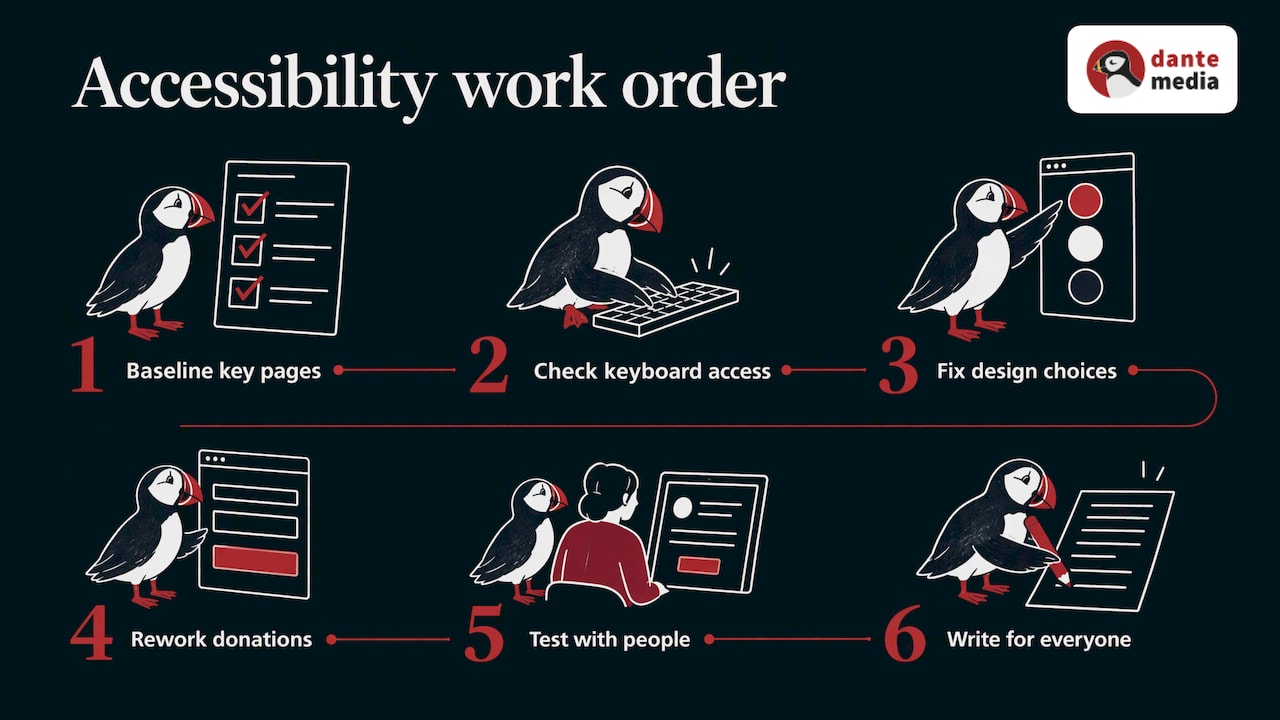
1. Baseline your most important pages
Run an automated scan on the donate page, any grant or application portal and your top three campaign pages, as Disability World recommends. Add monitoring on every new build so problems do not creep back.
2. Check the keyboard basics
The UK Department for Work and Pensions notes that most WCAG failures fall under the same 15 to 20 criteria. Its checklist covers the essentials: everything works by keyboard, there are no focus traps, a skip link works, and focus order is logical and visible.
3. Fix design and brand choices
The W3C advises sufficient text contrast and distinct, consistent states for links and buttons, with feedback such as confirming a form was submitted. This is where brand identity and accessibility meet: a palette should be tested for contrast before it is signed off, not after.
4. Rework the donation journey
The donate page is where inaccessibility costs most. Disability World’s checklist asks for keyboard-friendly amount fields, preset gifts as real radio buttons, a payment picker that keeps focus and tagged receipts. Usability gains pay back: Nielsen Norman Group estimated that fixing even minor donation-process problems could lift donations by about 10%.
5. Test with people, not just tools
NCVO, the UK voluntary sector body, says checkers such as WAVE cannot point out every issue. It advises involving disabled people with a range of access needs, never relying on colour alone, and asking partners and agencies about their accessibility standards. Plan a manual audit with disabled testers at least annually.
6. Write for everyone
Use plain language, descriptive link text, structured headings, captions on video and tagged PDFs. Impact reports are a common weak spot: our guide to impact report writing covers how to make them clear, and the same discipline makes them easier to publish in accessible formats.
Building accessibility into your brand and campaigns
Accessibility is cheapest when it is decided early. A visual identity, a campaign landing page and a donation journey designed together can meet WCAG 2.2 AA without retrofits. Our work on a new visual identity for impact shows how identity decisions shape everything downstream.
If you are writing a tender or brief, make accessibility an explicit requirement: the target standard, the testing method and who signs it off. At Dante we work exclusively with organisations creating positive impact, and our brand and design and website development and content services are built for that sector. If your brand, campaign or site needs to reach everyone it was made for, talk to us before the brief is final.
FAQ
Is my charity legally required to have an accessible website in the UK?
The Public Sector Bodies Accessibility Regulations require WCAG 2.1 AA for public-sector bodies. Charities are not named in them, but funders, public partners and the wider reputational stakes make WCAG 2.2 AA the sensible target. Take legal advice if you deliver public services under contract.
Which WCAG version should we aim for?
Aim for WCAG 2.2 Level AA. It is the current W3C Recommendation and builds on 2.1, so meeting it also satisfies the 2.1 AA requirement that most laws cite.
Are automated checkers enough?
No. They are a useful baseline and a good fit for continuous monitoring, but Site Brace’s 2026 research says automated testing catches only about a third of problems. Pair them with keyboard checks and testing with disabled people.
Where should we start if the budget is small?
Start with the donate page, your main forms and contrast in your brand palette. These are the places where barriers cost supporters most, and fixing them improves the experience for every visitor.
Sources
- Inclusive Design: Bring Web Accessibility to Your Nonprofit, MacArthur Foundation
- Inclusive Design: Web Accessibility for Nonprofits, MacArthur Foundation
- For NGOs and nonprofits, Disability World
- Nonprofit Website Accessibility: U.S. Guide for 2026, Clym
- The State of Web Accessibility 2026, Site Brace
- Non-Profit Organization Websites: Increasing Donations, Nielsen Norman Group
- Donation Usability: Increasing Online Giving, Nielsen Norman Group
- WCAG 2.2 Compliance Guide, Accesstive
- Nonprofit Accessibility Guide 2026
- Basic accessibility checks, DWP Accessibility Manual
- Designing for Web Accessibility, W3C WAI
- Understanding digital accessibility, NCVO
Recommended

Let's talk
